Prioritize Data Use Cases for Higher Education
Align investment to institutional goals.
- Data initiatives are proposed on a different timeline than the institution's planning cycle, making it hard to sequence investment.
- Competing operational areas – student success, research administration, finance, and others – each push their own use cases forward.
- No shared framework exists to evaluate and compare use cases against institutional strategy.
- Data readiness is often overestimated, leading to use cases being greenlit before the underlying data can actually support them.
Our Advice
Critical Insight
- A data use case has no inherent value – its value is only ever relative to how well it advances institutional strategy.
- No institution can afford to let its data portfolio be shaped by whichever stakeholder speaks loudest or pitches hardest.
Impact and Result
- A defensible, strategy-aligned shortlist of prioritized data use cases the CDO can bring to leadership.
- A ranked output and quadrant chart that visualizes value versus feasibility for every use case assessed.
- Output feeds directly into steps 4.1 and 4.2 of Info-Tech's Data Strategy blueprint.
Prioritize Data Use Cases for Higher Education
Align investment to institutional goals.
Analyst perspective
Anchor investment to institutional strategy, not the loudest sponsor in the room.

Higher education CDOs have multiple data requests from competing sponsors and no shared unit of measurement between them. The instinct is to solve this with more research: better use case descriptions, more vendor case studies, a longer catalog. That’s the wrong lever. The volume of well-documented use cases was never the constraint. The constraint is that strategic value, feasibility, and cost are each assessed by different people, on different scales, at different times. The decision defaults to whoever argued hardest in the room, not whoever built the strongest case.
The fix isn't more information. It’s a common currency. Six weighted value drivers, scored consistently against every use case, turn “the provost wants this” and “IT thinks this is easier” into numbers that sit on the same axis. That discipline is uncomfortable the first time an institution runs it because a popular initiative will score poorly and a boring compliance use case will score well. However, that discomfort is the framework working, not failing. A CDO who can show a skeptical CFO exactly why the master data project outranks the flashy chatbot has a defensible budget conversation. A CDO with a ranked list and no methodology behind it has an opinion.
Mark Maby
Senior Research Director, Industry Practice
Info-Tech Research Group
Executive summary
Your Challenge
Higher education CDOs face a long flat list of data use cases and no defensible basis for choosing between them.
- Operational areas compete for the same limited resources: student success, research, finance, facilities, and workforce.
- Planning cycles run 12-18 months; the landscape shifts before priorities are acted upon.
- Every use case looks equally compelling without a strategic anchor.
Common Obstacles
Feasibility, strategic value, and cost are each assessed informally and never combined.
- No shared evaluation framework: initiative lists substitute for strategy.
- Data readiness is overestimated: fragmented platforms and inconsistent metric definitions mean use cases that appear executable stall in production.
- Unweighted portfolios dilute resources no institution can afford a portfolio shaped by inertia.
Info-Tech’s Approach
A structured method for producing a defensible prioritized shortlist in a single working session.
- Anchor to strategy: six weighted higher education value drivers.
- Create a common currency: three dimensions combined into a single priority score.
- Deliver a shortlist: ranked output and quadrant chart ready for a data strategy.
Info-Tech Insight
Use cases only have value relative to an institutional strategy. Without weighted priorities anchoring the evaluation, every use case looks equally compelling, and no institution can afford a portfolio shaped by the loudest voice in the room.
Your challenge
Higher education CDOs are managing a growing list of data initiatives and need a defensible basis for choosing between them.
- The volume of potential data use cases in higher education has outpaced any institution's capacity to evaluate them rigorously. Across student success, research administration, finance, facilities, and workforce, CDOs inherit long lists of competing initiatives built under 12-to-18-month planning cycles that are fundamentally mismatched with the pace of technological disruption.
- The result is a portfolio shaped by inertia rather than strategy. Institutions that attempt to pursue too many initiatives simultaneously dilute the sponsorship and funding required to bring any single initiative to production. The CDO is left managing yesterday’s priorities while active disruptions go unaddressed.
PLANNING CYCLE MISMATCH
12-18 mo.
Traditional planning cycles rarely survive contact with the pace of technological disruption.
Source: CFAR
FINANCIAL PRESSURE
64%
of UK institutions project deficits by 2026–27; a potential £3.4B net income reduction sector-wide.
Source: Consultancy.uk
Common obstacles
Feasibility, strategic value, and cost are assessed informally and never combined.
No shared evaluation framework
Strategic value, feasibility, and cost are each assessed in isolation, by different stakeholders, on different scales, so the initiative with the clearest champion advances, not the one with the strongest case.Data readiness is systematically overestimated
Departments define the same KPI differently, so use cases that look executable on paper stall once the underlying data can't be reconciled across systems.Source: HelioCampusStrategic value is never weighted to institutional priorities
Every use case competes on equal footing whether it serves the provost's student success agenda or a back-office reporting need; an unweighted list can’t sequence the moves that matter.
NO SHARED EVALUATION FRAMEWORK
“A plan is not a strategy.”
Roadmaps become exhaustive lists that offer the appearance of direction but lack an integrated core of choices.
Source: CFAR
ANALYTICS TALENT GAP
78%
rise in demand for higher-ed data scientists since 2015 — against institutional researcher salaries of $60-68K, well under the $133K market rate.
Source: Harvard, 2020
Prioritize Higher Education Data Use Cases
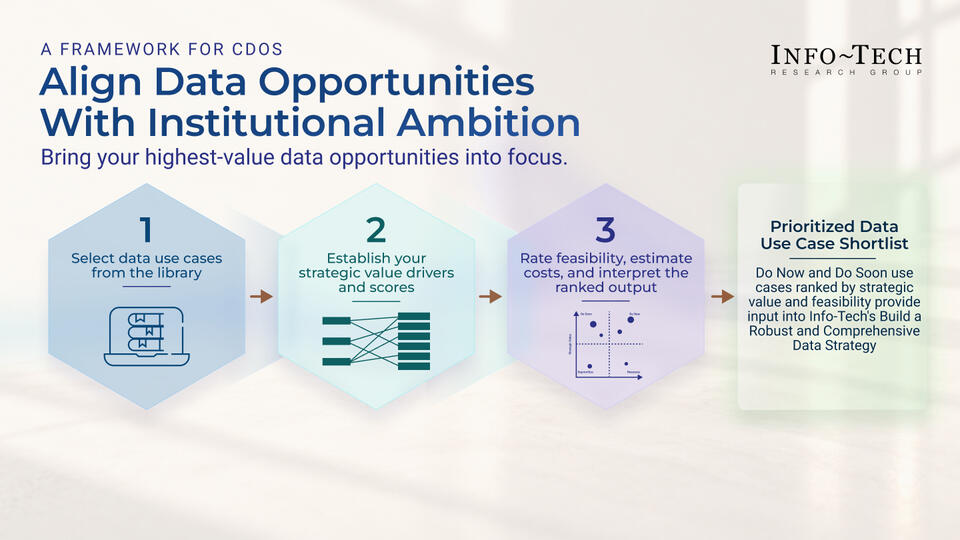
A Framework for CDOs
OVERARCHING INSIGHT
Use cases only have value relative to an institutional strategy. Without weighted priorities anchoring the evaluation, every use case looks equally compelling, and no institution can afford a portfolio shaped by the loudest voice in the room.
1: Select Data Use Cases From the Library
Select use cases from the library to build your longlist
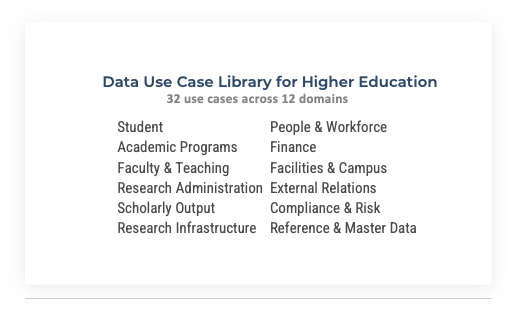
A longlist anchored in real use cases, not a wish list
2: Establish Your Strategic Value Drivers and Scores
Configure value drivers and score each use case against your institutional priorities
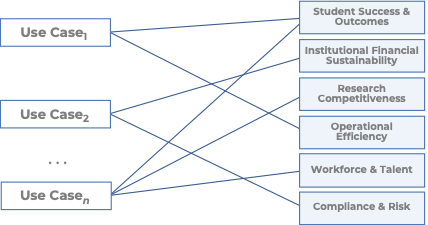
A strategic value score that reflects your institution's specific priorities, not generic best practice
3: Assess, Prioritize, and Act
Rate feasibility, estimate costs, and interpret the ranked output
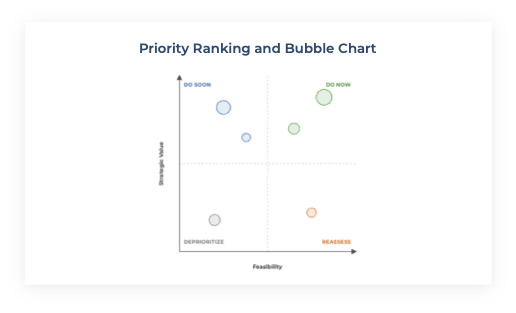
A defensible shortlist, ready for the next phase of your data strategy
OUTPUT
Prioritized Data Use Case Shortlist
Do Now and Do Soon use cases ranked by strategic value and feasibility provide input into Info-Tech's Build a Robust and Comprehensive Data Strategy
Info-Tech’s methodology for prioritize data use cases for higher education
Steps | 1. Select Data Use Cases From the Library
| 2. Establish Your Strategic Value Drivers and Scores
| 3. Assess, Prioritize and Act
|
Outcomes | A longlist anchored in real use cases, not a wish list. | A strategic value score that reflects your institution's specific priorities, not generic best practice. | A defensible shortlist, ready for the next phase of your data strategy. |
Step 1
Select Data Use Cases From the Library
Activities
- Select Your Use Cases
This step involves the following participants:
- CDO/CDAO
- Select data team members
- Line-of-business stakeholders (recommended, to confirm real institutional relevance before entries are locked in)
Outcomes of this step
A longlist anchored in real use cases, not a wish list.
1. Select your use cases
1-3 hours
- Work through the use case library and note which entries address a documented pain point, opportunity, or objective at your institution, not just a use case that sounds generally applicable to higher education.
- For each use case you plan to carry forward, confirm it reflects something your institution actually experiences or has expressed interest in. A use case with no institutional pain point behind it will not survive scoring in Section 2.
- Aim for 10-15 use cases in your first-pass longlist. Fewer than that risks missing a strong candidate; more than that stalls Section 2 scoring under its own weight.
- Enter each selected use case into Tab 2 Section A using the use case ID and name exactly as listed in the library. Do not rename, renumber, or merge entries.
- If a use case is flagged in the library as requiring joined records across two or more systems, note this now. You will need it in Activity 5 (Rate Feasibility) when rating Ability to Execute.
Input
| Output
|
Materials
| Participants
|
Download the Higher Education Data Use Case Prioritization Tool
Data Use Case Library for Higher Education
Thirty Data Use Cases From the Higher Education Industry
1.1: Daily Predictive Risk-Flagging for Proactive Advising
DOMAIN 1
Student
INSTITUTIONAL PROBLEM
Advisers cannot manually monitor every student's behavioral signals across systems. At-risk patterns — missed classes, declining grades, reduced LMS engagement, deteriorating aid balances — surface too late for a timely intervention. The result is preventable attrition that costs the institution retention revenue and costs students their degree progress.
HOW IT WORKS
A predictive model built by mining 2.5 million historical grade records scores roughly 40,000 enrolled students every night against ~800 risk indicators — course performance, major-fit signals, fee balances, LMS engagement changes. When a student crosses a risk threshold the system pushes an alert to their assigned adviser, who has a window (historically 48 hours) to reach out. The system does not intervene directly; it routes scarce adviser attention to the students statistically most likely to need it, before they self-report trouble.
DATA PREREQUISITES
- Student enrollment and demographic records (Domain 1)
- Historical grade and course completion data (Domain 2 / Domain 3)
- LMS engagement and attendance data (Domain 3)
- Financial aid balance and disbursement data (Domain 8)
PRIMARY ROLE OWNER
Provost / VP Student Success
EVIDENCE
Georgia State University deployed GPS Advising with EAB, monitoring 800 risk factors daily across 40,000 students. Since 2012 the program has driven 250,000+ alert-prompted advising meetings. Six-year graduation rate rose 23 points since 2003; four-year rate up 7 points since 2012. Achievement gaps by race, ethnicity, and income were eliminated; bachelor's degrees to African-American students up 103%. Tuition savings reported as $12M/year (NPR, 2016) or $21M/year (GSU).
REFERENCES
- “Approaching Student Success with Predictive Analytics,” Georgia State University
- NPR, 2016
BEFORE YOU SCORE
- Which of your active value drivers does this use case most directly serve?
- Do you have, or can you reasonably obtain, the data prerequisites listed above?
1.2: Critical Course Tracking and Major-Fit Redirection (eAdvisor)
DOMAIN 1
Student
INSTITUTIONAL PROBLEM
Students persist in majors they are unlikely to complete, consuming semesters and financial aid. Poor major fit typically surfaces in year three or four — too late for a cost-effective intervention. The institution absorbs the advising cost of a student who will not graduate; the student incurs debt without a credential.
HOW IT WORKS
Every major is mapped to a sequence of critical requirement courses and milestones that must be completed on time to remain degree-eligible. Each night the system recomputes every student's on-track or off-track status against that map. A student who fails a critical course is flagged as unlikely to succeed in that major and directed to meet an adviser before further registration — surfacing poor major fit in year one instead of year four.
DATA PREREQUISITES
- Student enrollment and academic standing records (Domain 1)
- Course completion and grade history (Domain 1)
- Major critical requirement definitions and course sequences (Domain 2 – Academic Programs)
- Degree audit and credit evaluation data (Domain 2)
PRIMARY ROLE OWNER
Provost / VP Academic Affairs
EVIDENCE
Arizona State University's eAdvisor improved four-year graduation rates from 33.2% (2006 cohort) to 44.8% (2009 cohort) — 2,024 additional graduates, an 11.6-point gain, with no change in entering SAT scores or class rank. Students on the correct course path rose from 22% to 91% in three years.
REFERENCES
- EvoLLLution, 2014
- ASU News, 2015
BEFORE YOU SCORE
- Which of your active value drivers does this use case most directly serve?
- Do you have, or can you reasonably obtain, the data prerequisites listed above?
1.3: Course-Level Early Warning and Learning Analytics (Course Signals)
DOMAIN 1
Student
INSTITUTIONAL PROBLEM
Faculty lack real-time visibility into which students are disengaging within a course. At-risk students continue undetected until mid-term grades surface the problem — by which point the window for an effective intervention has often already closed.
HOW IT WORKS
Within a single course, a model combines a student's grades-to-date, demographic and academic-history data, and LMS click/login activity to compute a red/amber/green risk signal, which is shown directly to the student and routed to the instructor mid-semester. Unlike institution-wide alert systems, this operates at the course level: a real-time signal specific to one student’s current engagement in one class, not their historical risk profile across the institution.
DATA PREREQUISITES
- Student academic history and demographic records (Domain 1)
- LMS click, login, and engagement data (Domain 3 – Faculty & Teaching)
- Grades-to-date and assignment completion within the current course (Domain 3)
PRIMARY ROLE OWNER
Provost / VP Student Success
EVIDENCE
Purdue University's Course Signals showed 87.4% vs. 69.4% four-year retention for users vs. non-users in Purdue's own published data. Starting in 2013, these claims were publicly contested — critics documented in EDUCAUSE Review argued the effect was better explained by reverse causality: struggling students who were about to withdraw simply took fewer Signals-enabled courses. Independent causal replication does not exist. Independent researchers have since disputed the causal claim, arguing the effect may reflect struggling students dropping Signals-enabled courses rather than the tool improving outcomes.
REFERENCES
- EDUCAUSE, 2012
- EDUCAUSE, 2013
BEFORE YOU SCORE
- Which of your active value drivers does this use case most directly serve?
- Do you have, or can you reasonably obtain, the data prerequisites listed above?
1.4: Student-Success Program Efficacy Analysis
DOMAIN 1
Student
INSTITUTIONAL PROBLEM
Institutions invest in many programs without knowing which actually move the needle for which students. Resources flow to programs that correlate with already-successful students opting in, not to programs that causally improve outcomes. The distinction matters for every budget decision student-success leadership makes.
HOW IT WORKS
Propensity-matched scoring compares retention and persistence outcomes for students who did vs. did not participate in a specific intervention — coaching, tutoring, advising — controlling for self-selection bias. Students who participated are matched against a statistically similar group of non-participants, isolating the program's causal contribution from the effect of motivated students simply opting in to available support.
DATA PREREQUISITES
- Student enrollment, retention, and persistence records (Domain 1)
- Intervention participation records: coaching, tutoring, advising (Domain 1 / Domain 2)
- Academic program and course completion data (Domain 2)
- Financial aid and fee records (Domain 8)
PRIMARY ROLE OWNER
Provost / VP Student Success
EVIDENCE
University of Texas at San Antonio used Civitas Learning's initiative analysis to evaluate its Student Success Coaching program, achieving a 16-percentage-point increase in first-year retention and a 14-point increase in six-year graduation rate from 2012 to 2022.
REFERENCES
- Civitas Learning, 2022
- Civitas Learning, 2024
BEFORE YOU SCORE
- Which of your active value drivers does this use case most directly serve?
- Do you have, or can you reasonably obtain, the data prerequisites listed above?
1.5: Gen AI Conversational Nudging to Reduce Summer Melt and Stop-Out
DOMAIN 1
Student
INSTITUTIONAL PROBLEM
Admitted students fail to complete required enrollment tasks over the summer: FAFSA verification, immunization records, housing deposits, registration. Staff cannot personally contact thousands of admits at the required pace. Tasks go incomplete and students melt away before the semester starts, forfeiting a seat the institution has already reserved.
HOW IT WORKS
A text-message-based conversational AI answers admits’ questions and proactively nudges them through required enrollment tasks at a volume no human team could match. Of 50,000+ student messages in GSU’s trial, less than 1% required escalation to staff. Effectiveness was established via randomized controlled trial: half of admitted students were randomly assigned to chatbot outreach; the other half received standard outreach only, allowing direct outcome comparison.
DATA PREREQUISITES
- Admitted student enrollment status and task-completion records (Domain 1)
- Financial aid document and verification status (Domain 11 – Compliance)
PRIMARY ROLE OWNER
VP Enrollment Management
EVIDENCE
Georgia State University’s “Pounce” chatbot (Mainstay/AdmitHub): RCT found a 21.4% reduction in summer melt for students who committed by the priority deadline; enrollment increase reported as 3.3-3.9% across two publications of the same study. GSU estimated the bot handled the messaging volume equivalent to ~10 full-time staff. A subsequent RCT found a 50% decrease in withdrawals due to outstanding balances.
REFERENCES
- Mainstay, 2022
- Brookings Institution, 2022
- Campus Technology, 2017
BEFORE YOU SCORE
- Which of your active value drivers does this use case most directly serve?
- Do you have, or can you reasonably obtain, the data prerequisites listed above?
1.6: Micro-Grant Retention Targeting
DOMAIN 1
Student
INSTITUTIONAL PROBLEM
Students who are academically on track drop out over small unpaid balances — amounts modest relative to the lifetime cost of losing a student permanently. Financial aid offices cannot identify and reach these students at scale without an automated trigger. The institution pays the full cost of attrition while the fix is a fraction of that cost.
HOW IT WORKS
Students facing a small unpaid balance who are otherwise academically on track are automatically identified from enrollment and balance data — no application required. Their balance is cleared up to a cap of $2,500, typically in exchange for a required action such as meeting a financial counsellor. This is a targeting-and-disbursement automation built on existing enrollment and balance data, not a predictive risk model.
DATA PREREQUISITES
- Student enrollment and academic standing records (Domain 1)
- Unpaid balance and financial aid disbursement data (Domain 8 – Finance)
PRIMARY ROLE OWNER
VP Student Affairs / CFO
EVIDENCE
Georgia State Panther Retention Grants: average grant ~$900, balance cap $2,500. 82-88% of recipients graduate or remain enrolled 12 months later. More than 19,000 awards issued by 2023. Program independently evaluated by Ithaka S+R (2022), confirming positive effects on retention and graduation. Each grant is disbursed automatically, with no student application required.
REFERENCES
- "Panther Retention Grants,” Georgia State University
- Ithaka S+R, 2022
- Inside Higher Ed, 2022
BEFORE YOU SCORE
- Which of your active value drivers does this use case most directly serve?
- Do you have, or can you reasonably obtain, the data prerequisites listed above?
2.1: Predictive Course-Demand Forecasting and Schedule Optimization
DOMAIN 2
Academic Programs
INSTITUTIONAL PROBLEM
Course schedules are rolled forward from last year’s section counts rather than built against actual demand. Bottlenecked, oversubscribed courses delay students’ time to degree, while other sections run under-enrolled, wasting seats, faculty time, and classroom space.
HOW IT WORKS
Historical enrollment patterns and declared program pathways are run through a forecasting model that predicts how many seats each course section will need next term. The registrar builds the schedule to match that projected demand instead of rolling forward last year’s section count — reducing both empty seats and the bottlenecked, oversubscribed courses that delay graduation.
DATA PREREQUISITES
- Historical course enrollment and section-fill data (Domain 2)
- Declared program/major pathways and demand signals (Domain 1 – Student)
- Classroom and facility capacity data (Domain 9 – Facilities)
PRIMARY ROLE OWNER
Registrar / VP Academic Affairs
EVIDENCE
Ad Astra's platform is used by 500+ institutions. Germanna Community College: Degree Velocity rose 15% (41% to 47%), with a 2% increase in credits earned per semester, confirmed against Ad Astra's own case study. Bossier Parish: 10.9% enrollment growth confirmed.
REFERENCES
- "Germanna Community College: Creating Scheduling Efficiency,“ Ad Astra
- "BPCC Case Study: Boosting Outcomes with Smart Plans,” Ad Astra
BEFORE YOU SCORE
- Which of your active value drivers does this use case most directly serve?
- Do you have, or can you reasonably obtain, the data prerequisites listed above?
2.2: Curricular Complexity Analytics for Program Review
DOMAIN 2
Academic Programs
INSTITUTIONAL PROBLEM
Curriculum structure, prerequisite chains, and bottleneck courses silently delay student completion. These structural problems are invisible in grade data alone and are rarely surfaced until a program review, by which point years of cohort delay have already accumulated.
HOW IT WORKS
Every undergraduate degree plan is modeled as a directed graph of courses and prerequisites. Software computes structural metrics, centrality (how much of a choke point a course is), blocking factor, and delay factor, to mathematically identify which specific courses are extending time-to-degree, independent of any faculty member’s opinion about the curriculum.
DATA PREREQUISITES
- Degree plan and curriculum maps with prerequisite definitions (Domain 2)
- Historical course completion and grade data by cohort (Domain 1 – Student)
- Student registration sequence and actual course-taking patterns (Domain 1 – Student)
PRIMARY ROLE OWNER
Provost / VP Academic Affairs
EVIDENCE
University of Texas at Dallas is one of ~30 universities in the Curricular Analytics Project (Sept. 2021to Aug. 2024), computing centrality, blocking factor, delay factor, and complexity scores for all undergraduate programs. UT Dallas’s own program page describes the project as “validating the relationship between curricular structure and student outcomes.” The outcome metrics remain structural and qualitative rather than quantified to date.
REFERENCES
- UT Dallas Curricular Analytics Project
BEFORE YOU SCORE
- Which of your active value drivers does this use case most directly serve?
- Do you have, or can you reasonably obtain, the data prerequisites listed above?
3.1: Adaptive Courseware to Lift Gateway-Course Pass Rates
DOMAIN 3
Faculty & Teaching
INSTITUTIONAL PROBLEM
High DFW (D grade, Fail, Withdrawal) rates in gateway math and science courses block student progression, disproportionately affecting underprepared students. Fixed-pace lecture formats serve neither the students who are already ahead nor those who are behind — everyone moves at the same speed regardless of individual knowledge gaps.
HOW IT WORKS
Each student works through material on a platform that opens with a diagnostic knowledge check, places them at the point in the curriculum matching what they already know, and continuously reassesses and resequences material to their actual gaps. At ASU, the courseware fully replaced the textbook, exams, and lectures, not a supplement to existing instruction but a redesign of the course itself.
DATA PREREQUISITES
- Individual student learning-activity and assessment data within the courseware (Domain 3)
- Student academic history and course placement records (Domain 1 – Student)
- Course completion and grade outcomes (Domain 1 – Student / Domain 2)
PRIMARY ROLE OWNER
Provost / VP Academic Affairs
EVIDENCE
Arizona State University redesigned College Algebra with ALEKS adaptive courseware, winning the 2018 OLC Digital Learning Innovation Award ($100,000). Success rates rose from 55% (AY15-16) to 75% (AY16-17) to 79% (AY17-18) — a 20-point gain in two years, with 800+ additional students passing in year one. Underprepared students improved by 28 points. A later “stretch semester” option brought rates to 84%. Figures confirmed against OLC’s own award citation and Inside Higher Ed’s reporting.
REFERENCES
- Online Learning Consortium, 2018
- Inside Higher Ed, 2019
- Campus Technology, 2018
BEFORE YOU SCORE
- Which of your active value drivers does this use case most directly serve?
- Do you have, or can you reasonably obtain, the data prerequisites listed above?
3.2: Faculty Workload and Instructional-Capacity Analytics
DOMAIN 3
Faculty & Teaching
INSTITUTIONAL PROBLEM
Departments cannot see teaching productivity against instructional cost. Resources flow to departments based on history and advocacy rather than actual section demand, producing both over-resourced units running under-enrolled sections and high-demand units short of capacity — a mismatch invisible in traditional budget processes.
HOW IT WORKS
Course-load, section-size, and instructional-cost data are compared at the department level against teaching output. The analysis shows deans where capacity is mismatched to demand. For example, a small department running many under-enrolled sections alongside a high-demand department that is short on sections, supporting decisions to reallocate sections or staffing rather than apply blanket budget cuts.
DATA PREREQUISITES
- Faculty course assignment and teaching-load records (Domain 3)
- Section enrollment and fill-rate data (Domain 2 – Academic Programs)
- Instructional cost and compensation data (Domain 8 – Finance)
PRIMARY ROLE OWNER
Provost / Dean / CFO
EVIDENCE
EAB publishes analyses of faculty workload, instructional capacity, and teaching productivity as financial-health levers, used at member institutions to reallocate sections and reduce part-time instructional cost. Specific institutional outcomes are typically confidential. This use case is primarily a financial diagnostic rather than a student-outcome driver; its value is in revealing cost mismatches that aggregate budget reports mask.
REFERENCES
- EAB Research and Insights
BEFORE YOU SCORE
- Which of your active value drivers does this use case most directly serve?
- Do you have, or can you reasonably obtain, the data prerequisites listed above?
About Info-Tech
Info-Tech Research Group is the world’s fastest-growing information technology research and advisory company, proudly serving over 30,000 IT professionals.
We produce unbiased and highly relevant research to help CIOs and IT leaders make strategic, timely, and well-informed decisions. We partner closely with IT teams to provide everything they need, from actionable tools to analyst guidance, ensuring they deliver measurable results for their organizations.
What Is a Blueprint?
A blueprint is designed to be a roadmap, containing a methodology and the tools and templates you need to solve your IT problems.
Each blueprint can be accompanied by a Guided Implementation that provides you access to our world-class analysts to help you get through the project.
Talk to an Analyst
Our analyst calls are focused on helping our members use the research we produce, and our experts will guide you to successful project completion.
Book an Analyst Call on This Topic
You can start as early as tomorrow morning. Our analysts will explain the process during your first call.
Get Advice From a Subject Matter Expert
Each call will focus on explaining the material and helping you to plan your project, interpret and analyze the results of each project step, and set the direction for your next project step.
Unlock Sample Research